Why The World Needs Flarion. Read More

Eliminate Redundant Data Processing

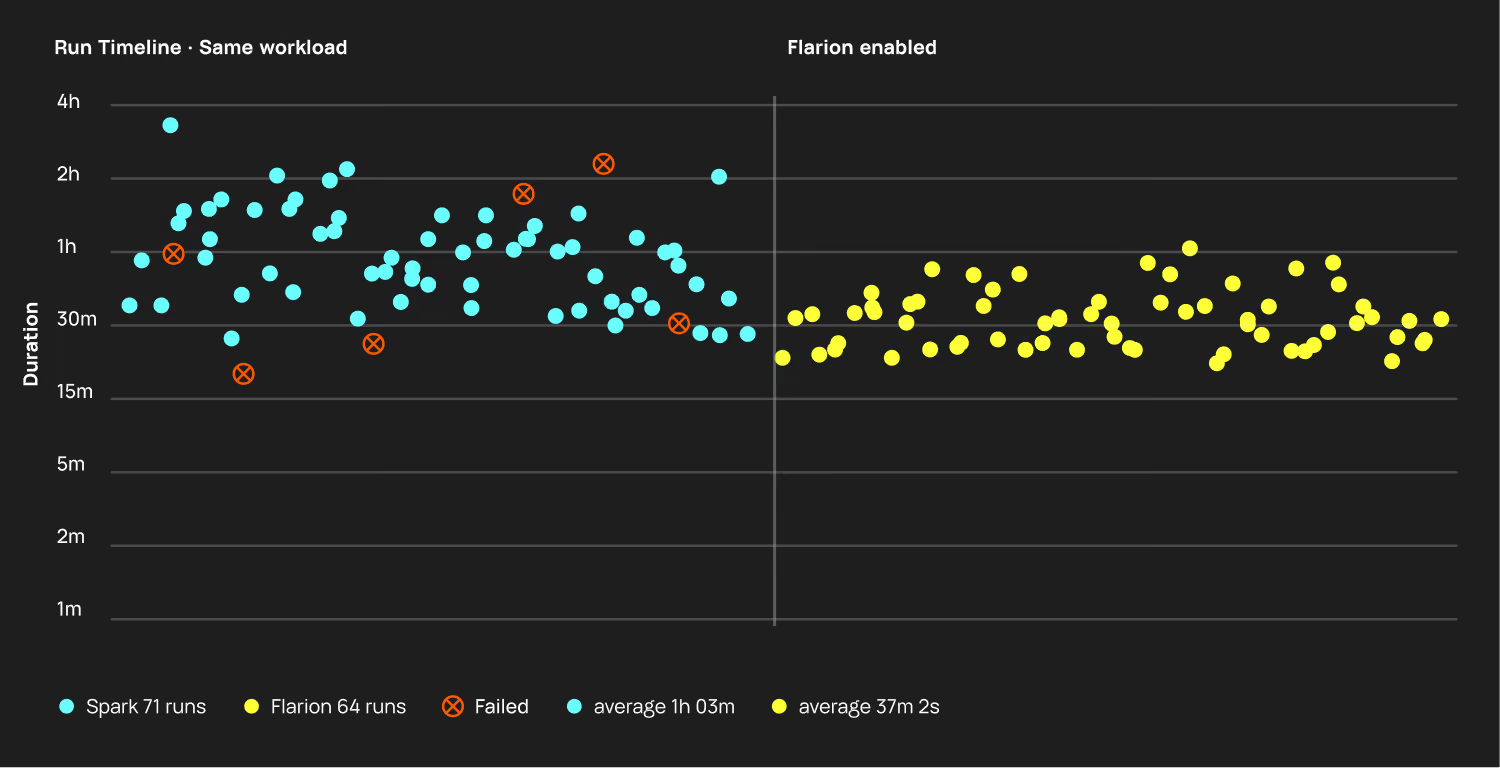
3× faster job execution. No additional hardware required — zero code and infrastructure changes.

Accelerate Ray With Intelligent Caching

Flarion’s advanced, database-inspired caching reduces redundant data processing, speeding up tasks and boosting efficiency—no extra infrastructure required.
3x Faster Execution

Eliminate redundant computations and boost task speeds, especially for long-running operations.

Smaller Clusters, Lower Costs

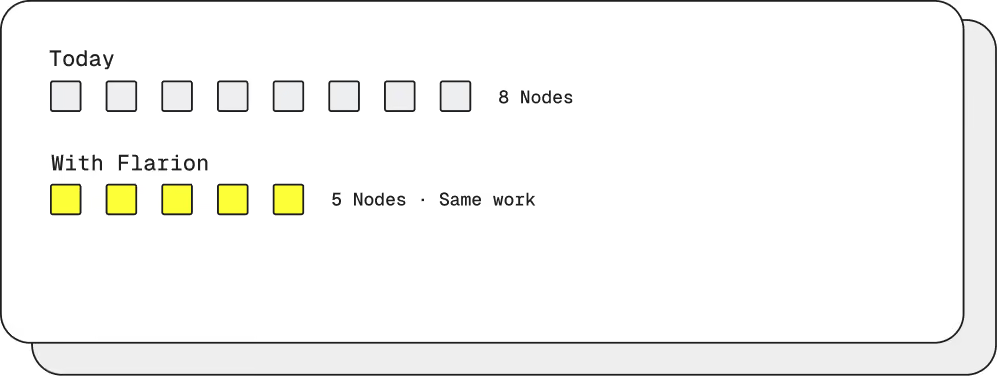
Use smaller clusters for the same tasks, reducing the risk of failure and improving price performance.

Effortless Integration

Seamlessly integrates into Ray with no code changes; Flarion automatically caches processed data for continuous performance gains.

Ray vs. Ray With Flarion Workload Caching

Capability
Job Execution Speed
Resource Consumption
Caching Engineering Effort
Code Changes
Standard Ray
Baseline (1x)
High
Large (manual, in code)
Required (manual caching)
Flarion-Powered Ray
Up to 3x Faster
Significantly Reduced
None (automatic)
None (automatic caching)

Core Capabilities

Result Caching

Caches task outputs in memory or disk for reuse, enabling entire tasks to be skipped on repeated executions, significantly reducing processing time and resource usage.

Data Block Caching

Stores frequently accessed data in memory to minimize data transfer and serialization overhead, accelerating task performance and reducing I/O operations.

Intelligent Buffer Management

Optimizes memory by strategically managing cached data based on usage patterns, prioritizing critical data, and dynamically allocating resources to maximize real-time performance.

How Intelligent Caching Works

Standard Ray

Organizations often run tasks that process the same data multiple times, leading to redundant data processing and increased execution times and costs. Ray, by default, may reprocess this data each time.

Flarion-Powered Ray

Flarion eliminates redundant data processing through intelligent caching, automatically storing and reusing previously processed data to enhance task performance and efficiency.

Workflow Before

Standard Ray relies on manual caching, which is challenging to manage and offers limited benefits.

Flarion Ray workflow diagram
Workflow After

Flarion-Powered Ray automates caching seamlessly, identifying repeated data processing and caching it to deliver improved performance.

Flarion Accelerated
Standard Ray
Flarion Ray workflow diagram

Core Performance Benefits

3x Faster Processing

Intelligent caching cuts execution times for repeated tasks and large datasets, speeding up operations by up to 3x over standard Ray.

Cost Efficiency With Fewer Resources

Reduce costs by up to 60% with optimized cluster efficiency—handle more without additional infrastructure.

Automated 
Performance Gains

Flarion’s automated caching delivers ongoing optimization with zero manual intervention, freeing up teams for core development.

Seamless
Scalability

Effortlessly scale to meet growing data demands. Flarion optimizes resources in real time for consistent performance across any workload.

Optimized Resource Utilization

Minimize CPU and memory use by reusing processed data. Flarion’s caching keeps your Ray clusters running at peak efficiency.

The Latest Data Processing News & Insights

Spark 4.2 was released in mid-July, and a lot of the attention went to the headline features: geospatial types, change data capture, vector search. Tucked into the performance section was a smaller item that we found particularly interesting. Arrow-optimized Python UDFs, and Arrow-based data exchange with Python in general, are now on by default.

One can consider this a mere config flip. The feature has existed since Spark 3.5. But defaults are how a platform tells you what it considers normal, and Spark just declared that the normal way to move data between the JVM and Python is Apache Arrow. It's worth walking through why that boundary was slow in the first place, what Arrow does about it, and what it changes for everything sitting underneath.

What a Python UDF Actually Costs

PySpark has a split identity. The engine that executes your job runs on the JVM, and your UDF runs in a separate Python process, because that's where Python code has to run. Every batch of rows that passes through the UDF makes a round trip: out of the JVM, across a socket into the Python worker, through your function, and back.

Until now, the default way to make that trip was pickle. Each row was converted from Spark's internal representation into a Python object, serialized, sent across, deserialized, processed, and then the whole sequence ran again in reverse. One row at a time, one object at a time. The work is pure overhead. It exists because the two sides of the boundary represented the same data differently, and translation was the only way across.

For UDF-heavy jobs the translation regularly cost more than the function being called. It's one of the oldest pieces of PySpark folklore: keep your logic in built-in expressions if you can, because the moment you write a Python UDF, you pay a tax that has nothing to do with what the UDF does.

What Arrow Brings to the Table

Apache Arrow is a specification for how tabular data is laid out in memory: columnar, in large contiguous buffers, with a defined binary layout for every type. The layout is the same regardless of which language or engine produced it. If two systems both hold data in Arrow format, one can hand the other a batch without converting anything, given that the bytes are already in the shape the receiver expects.

Applied to the Python boundary, this removes most of the tax. Instead of serializing rows into Python objects, the JVM sends Arrow batches, and the Python side reads them directly as columnar data. There is still a process boundary and still a copy across the socket, but the expensive part - turning every value into an object and back - is gone. Spark's own benchmarks for Arrow-optimized UDFs showed roughly 2x speedups on chained UDFs when the feature shipped in 3.5, with larger gains the more the workload was dominated by the boundary rather than the function.

The history of this feature tells you something about defaults. Arrow UDFs arrived as an opt-in in Spark 3.5. Spark 4.1 added Arrow-native UDF decorators that skip the pandas conversion entirely. With 4.2, Arrow is the default and pickle is the fallback. Everyone gets the faster boundary, including the large majority of users who never knew there was a flag.

The Ecosystem Keeps Converging on Arrow

The UDF change is one instance of a pattern that has been running for years. `toPandas` and `createDataFrame` now use Arrow by default too, in the same release. Spark Connect streams query results to clients as Arrow batches. Outside of Spark: pandas can be backed by Arrow, Polars is built on it, DuckDB reads and writes it natively, DataFusion uses it as its internal memory model. When these systems exchange data with each other, more and more often no conversion happens, because both ends already speak the same format.

This is what a de facto standard looks like while it's forming. Nobody mandated Arrow; each project adopted it because interoperating through a shared memory layout is cheaper than maintaining pairwise converters. Every Spark release for the past several years has replaced another row-based boundary with an Arrow one, and there's no reason to expect the direction to reverse.

What the Default Doesn't Change

It's worth being precise about what got faster. The boundary between the JVM and Python is now columnar. The engine on the JVM side of that boundary is the same one it was before — predominantly row-oriented, executing on the heap, one row at a time through most operators.

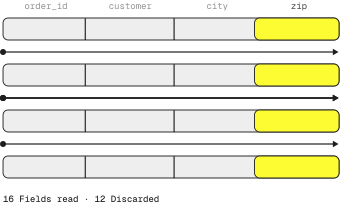
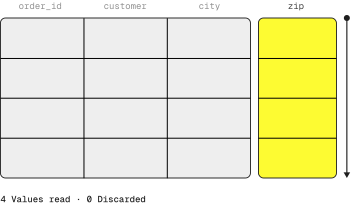
That produces a slightly odd shape for a typical PySpark job. The scan reads Parquet, which is columnar on disk. Spark turns it into rows to execute the joins and aggregations. At the UDF boundary, those rows are batched back into Arrow's columnar form, shipped to Python, processed, returned, and turned back into rows for whatever comes next. The data changes representation multiple times, and the fast columnar format only exists at the edges. Spark 4.2 made the edges cheap. The middle is where most of the job's time goes, and the middle didn't change.

Rewriting the executor is a different scale of undertaking than adopting Arrow at the boundaries, and the boundaries were a reasonable place to start. But the release defines the remaining gap fairly precisely: the format Spark now uses to talk to Python is not the format it uses to compute.

Running the Middle on Arrow Too

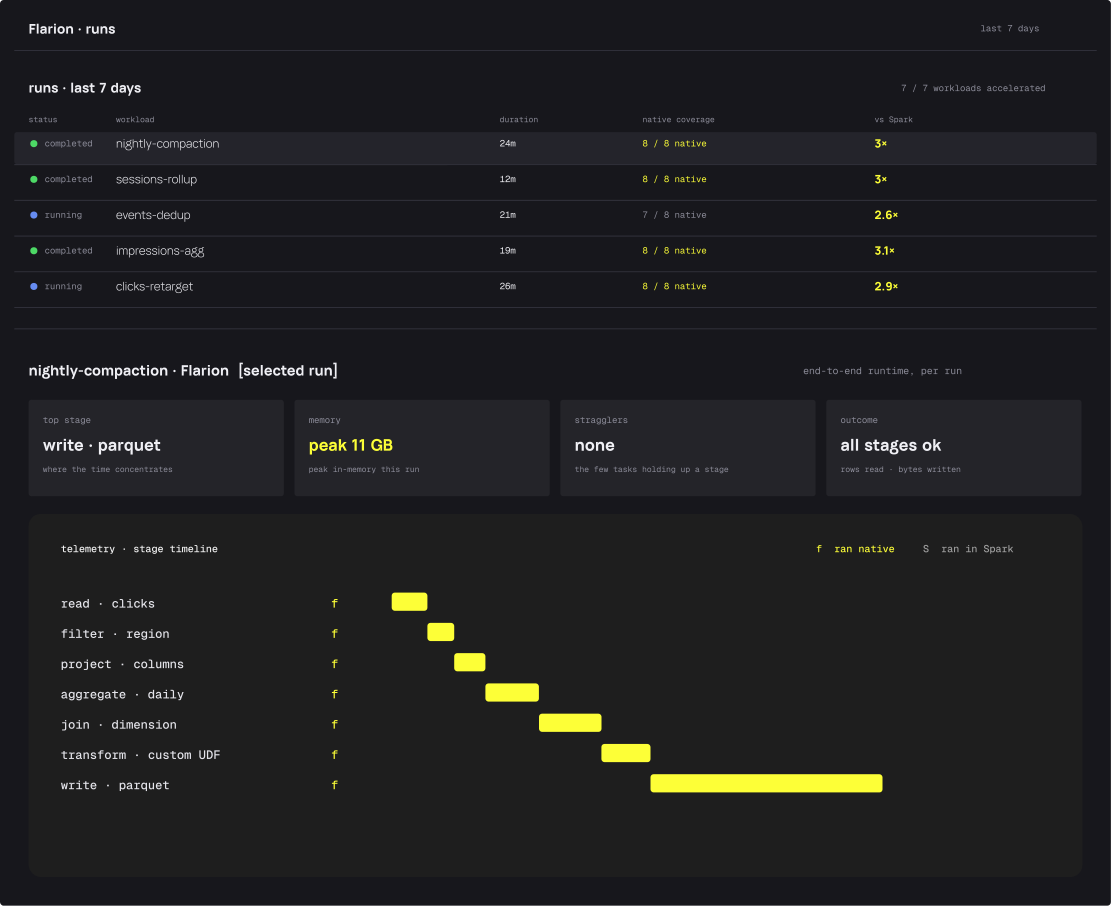
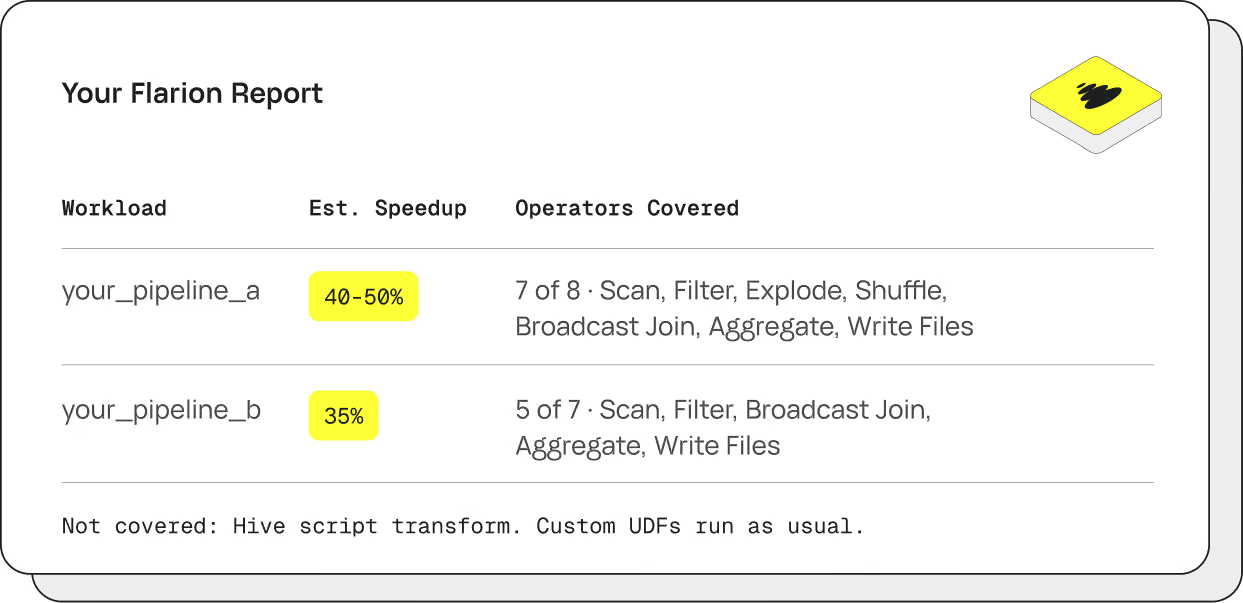
That gap is where Flarion sits. Our engine executes Spark's operators - scans, joins, aggregations, and the rest - in native Rust code built on Apache Arrow and DataFusion, replacing the row-at-a-time JVM path for the parts of the plan it supports. Inside the engine, data stays in Arrow's columnar layout the whole way through. It goes in as a plugin on the Spark job you already have; unsupported operations fall back to Spark and run the way they always did.

Spark standardizing its boundaries on Arrow makes this arrangement steadily cleaner. When the engine hands data back to Spark, or Spark hands data to a Python worker, both sides increasingly agree on the memory layout, so the crossings that used to require translation become handoffs. Data moves between Spark's JVM and our engine through Arrow's C Data Interface without copying at all — a pointer to the buffers crosses the boundary, and the data stays where it is.

The UDF change is a preview of what that feels like, applied to one boundary. The excitement around it comes from removing translation overhead at a single crossing point. An Arrow-native engine applies the same idea to the execution itself: the scan produces Arrow, the join consumes Arrow, and the representation never changes because there's nothing to change it into.

Summing Up

Spark 4.2's UDF change is a nice speedup, but the reason it caught our attention is what it says about direction. Spark is a conservative project and it doesn't change defaults lightly, because millions of jobs run on whatever the defaults are. When a project like that decides Arrow is how data should cross the Python boundary, it's acknowledging what the rest of the ecosystem already settled on. In short, the future is Arrow.

If you've run Spark for any length of time, you might have seen a job stall for no obvious reason. The data is loaded, the executors are up, the CPUs are barely ticking over, and the stage just sits there. The culprit is usually garbage collection. In this post we'll look at why it happens and what can be done about it.

What the JVM Is Doing When Everything Stops

Spark runs on the JVM, and the JVM is responsible for memory management. Your code creates objects as it works through the data, the dead ones pile up, and a background process called the garbage collector comes along and clears them out. Most of the time this happens seamlessly and without any user impact.

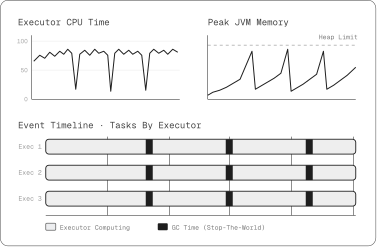
The trouble is in how it clears them. Before the collector can safely reclaim memory, it needs a moment where nothing is changing underneath it, so it can tell which objects are still in use. To get that moment, it stops the program. Every thread on the executor freezes at the same instant and waits. These are called stop-the-world pauses, and the name is honest about it. Nothing runs until the collector is finished.

Sometimes people ask, does the program really just wait for garbage collection? The answer is yes, that's exactly what happens. It's worth being fair to the modern collectors, because they're good. They do most of their bookkeeping concurrently, alongside the running job, precisely to keep these freezes short, and any single pause today is usually quick. But quick isn't free. The pauses never go away entirely, and the collectors tuned for data throughput will take longer pauses on purpose, because it lets them get more done in between. Add up enough short freezes across a big fleet and a long job, and you're looking at real idle time, which hits both performance and cost.

Can’t I Solve This Problem By Tuning?

The natural fix is to tune. Switch collectors, give it a bigger heap, change how the memory is split. This helps, but only up to a point.

Spark processes data a row at a time, and represents each value as an object on the heap. A single stage over a large dataset creates a huge number of short-lived objects: a value gets boxed, wrapped in an iterator, passed through an operator, and discarded. Every one is work the collector has to do later, and the faster they pile up, the more often it runs. No setting changes that. You can make collection faster and the pauses shorter, but you can't make the collector do less while the engine above it produces garbage by design. That's the ceiling.

Pauses aren't the whole cost either. The objects carry overhead of their own: headers, boxing and unboxing, and a scattered memory layout the CPU can't read efficiently. You pay for it whether the collector is running or not, and it usually stays hidden until someone profiles the job.

Not Making the Garbage in the First Place

If the volume of short-lived objects is the real problem, then the way out is an engine that doesn't create them to begin with, and that's a change you make well below anything a config file can reach. Flarion replaces Spark's row-by-row execution with a native engine written in Rust, built on Apache Arrow and DataFusion. Two things about that design do most of the work.

First, it's columnar. Instead of a parade of individual row objects, data moves through the engine in large contiguous blocks, one per column. The operation that used to allocate an object per value now chews through a whole block at once. The torrent of short-lived objects that kept the collector busy is never generated, so there's nothing to collect.

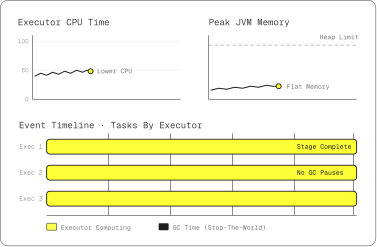
Second, there's no garbage collector in the picture because Rust doesn't use one. It tracks the ownership of memory as part of the language, so a piece of memory is freed at an exact, known point in the program, the instant it's no longer needed, and nothing ever has to stop the world to go hunting for what's dead. The data also lives off-heap, outside the JVM's managed memory entirely. There's no mechanism left to produce the idle time you were watching, so it's largely gone.

This doesn’t mean we’ve left the JVM behind. It still runs there, and it reaches the native engine through JNI, the standard bridge between Java and native code. What crosses that bridge is control and a handle to where the data lives, not the data itself, which stays off-heap on the native side. So handing work across to the engine doesn't pull everything back onto the heap for the collector to find, and the garbage stays uncreated.

Where It Doesn't Reach

Native execution covers most of a job, not all of it. The driver, the query planning, and any operation the engine doesn't support yet still run on the heap and still make objects for the collector. So garbage collection doesn't disappear from a real workload, it shrinks, and whatever is left tends to gather in the stages that haven't been converted. On more than one workload we've watched it settle into the final write, the last step still handing data back through the JVM. How much you're left with simply tracks how much of the job still runs on Spark.

None of this is something you have to manage. Flarion goes in as a plugin inside the Spark job you already have. What it supports runs natively, with no collector and no pause, and what it doesn't falls back to Spark and runs the way it always did. The acceleration happens underneath, and for the parts that run natively, the pause you used to wait on isn't there.
What This Adds Up To

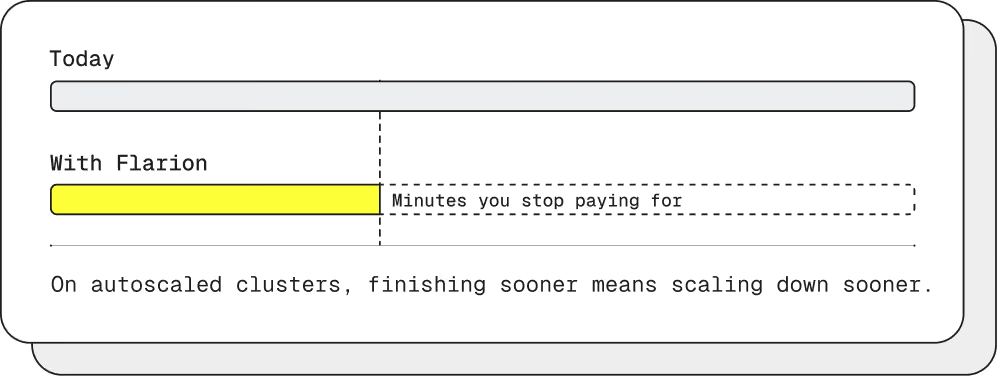
Garbage collection sets a floor on how well a JVM-based engine can perform at scale. Tuning lowers that floor but never removes it, because the engine keeps producing the work the collector has to clear. Getting under the floor means not creating the garbage at all, which is why the same jobs, unchanged, run faster on a native engine. They finish sooner, and the bill for all that idle time goes with them.

Faster, Smarter, More Powerful Data Processing

Up to 3x faster processing.
Reduced costs.
Accelerated jobs.